
If you run an MSP, you probably know your monthly revenue. You might even know your net income.
But do you know your true gross margin?
For many MSPs using ConnectWise or Halo integrated with QuickBooks Desktop or QuickBooks Online, gross margin is distorted — sometimes significantly. And when gross margin is wrong, pricing decisions, hiring decisions, and growth plans are built on bad data.
Revenue Is Not the Same as Profit
Managed service providers typically have multiple revenue streams:
• Managed services (MRR)
• Projects
• Hardware sales
• Software resale
• Cloud resale
• Break/fix work
Each of these has a different margin profile.
For example:
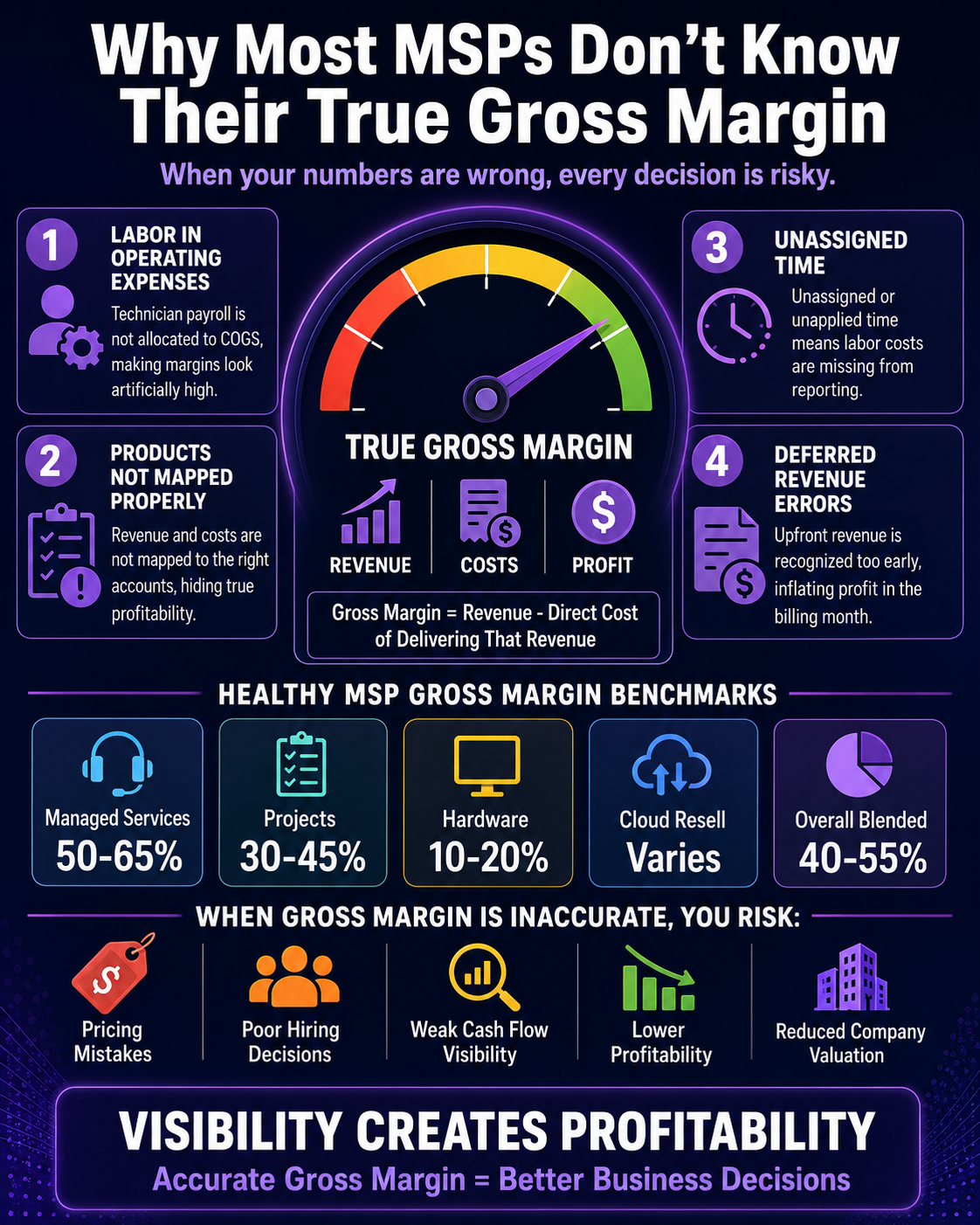
• Managed services might run at 50–65% gross margin
• Projects often land around 30–45%
• Hardware may be 10–20%
• Cloud resale margins vary widely
If everything is grouped into one income account in QuickBooks, you lose visibility. And if costs aren’t mapped properly, margins become meaningless.
What Gross Margin Actually Means for an MSP
Gross margin is:
Revenue – Direct Cost of Delivering That Revenue
For MSPs, direct costs typically include:
• Technician wages (or allocated labor cost)
• Payroll taxes & benefits tied to delivery staff
• Software tools used to deliver service (RMM, security tools, etc.)
• Hardware costs
• Cloud vendor costs
It does not include:
• Sales salaries
• Admin staff
• Rent
• Marketing
• Owner distributions
If labor isn’t properly captured as cost of goods sold (COGS), your gross margin will look artificially high.
Where MSP Gross Margins Get Distorted
1. Labor Is Sitting in Operating Expenses
Many MSPs run payroll entirely through an expense account under operating expenses. That means none of the technician cost is hitting COGS.
Result? Your gross margin looks incredible on paper — but it’s fake.
2. Products Aren’t Mapped to COGS Accounts
When invoices sync from ConnectWise or Halo to QuickBooks, products and services must map correctly to the appropriate income and COGS accounts.
If everything maps to one generic income and one generic COGS account, your service-line profitability disappears.
3. Unassigned or Unapplied Time
If your accounting doesn’t reconcile total paid labor against tracked time, you’re underreporting true service cost.
This often shows up as strong revenue, weak cash flow, and “we’re busy but not making money.”
4. Deferred Revenue Is Not Handled Correctly
If you bill annual managed services upfront but record all revenue immediately, your margin spikes artificially in that month.
True accrual accounting requires recognizing revenue monthly as earned.
How to Fix It
Step 1: Separate Revenue by Category
Your chart of accounts should include distinct income accounts such as:
• Managed Services Revenue
• Project Revenue
• Hardware Revenue
• Cloud Revenue
• Other Service Revenue
Step 2: Properly Structure COGS Accounts
Create separate COGS accounts such as:
• Direct Labor – Service
• Direct Labor – Projects
• Hardware COGS
• Cloud COGS
• Software Tools – Delivery
Step 3: Allocate Labor Intentionally
Technician payroll must be moved (fully or partially) into COGS using a structured allocation method.
Step 4: Reconcile PSA to QuickBooks Monthly
Each month, confirm invoiced revenue matches, vendor costs are recorded properly, AR aging aligns, and deferred revenue balances are accurate.
What Healthy MSP Gross Margins Look Like
Typical benchmarks:
• Managed Services: 50–65%
• Projects: 30–45%
• Hardware: 10–20%
• Overall blended gross margin: 40–55%
If your margins are significantly higher, double-check labor allocation. If lower, review pricing and technician utilization.
Final Thought
Most MSPs don’t have a revenue problem. They have a visibility problem.
When ConnectWise or Halo is properly integrated with a structured QuickBooks environment — and labor is handled correctly — your financials become a management tool, not just a tax requirement.
Accurate gross margin reporting allows you to:
• Price confidently
• Hire at the right time
• Improve technician utilization
• Increase company valuation
• Scale without sacrificing profitability
Schedule Your MSP Financial Diagnostic
If you use ConnectWise or Halo with QuickBooks Desktop or Online and want to know whether your margins are truly accurate, we offer a 15-minute MSP Financial Diagnostic.
We’ll review:
• Your chart of accounts structure
• PSA to QuickBooks mapping
• Labor allocation setup
• Revenue categorization
• Gross margin reporting clarity
You’ll walk away knowing whether your numbers are reliable — or where profit may be leaking.
Schedule your diagnostic here → Schedule Now
Because growing revenue is good. But growing profit is better.